
If you promote Stripchat with direct links and tag them with s1, s2 or s3 to know which page or which button converts, check your stats tonight. There is a good chance every row says “Without custom parameter”. We ran a split test for weeks before noticing that none of our tags had ever been recorded.
Our verdict
Fix it today
| Effort | 10 minutes per site |
| First results | Next day’s stats |
| We still use it | On every link |
The short version
- Stripcash, Stripchat’s affiliate program, sends direct links through the tracking domain
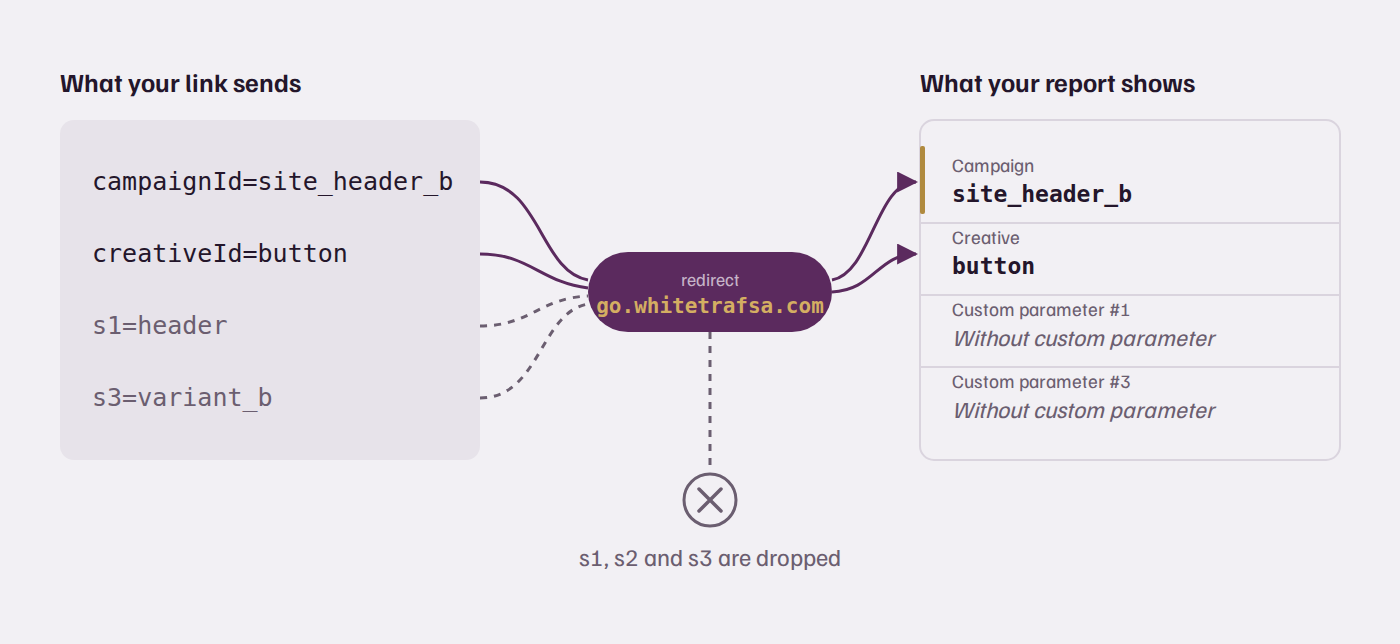
go.whitetrafsa.com. In our tests in summer 2026, that redirect dropped the custom sub-IDss1,s2ands3: they never reached the Stripcash report. - The parameters
campaignId,creativeIdandsourceIddo survive the redirect and appear in their own columns of the Stripcash statistics. - Stripchat widgets behave differently: their custom parameters
p1andp2are recorded as custom parameter #1 and #2. - To track a page, a placement or a test variant on a direct Stripcash link, put the tag in
campaignId(for examplemysite_header_b) instead ofs1.
Which Stripcash parameters reach your report?
Only campaignId, creativeId and sourceId reached the report on direct links in our tests; the s1 to s3 sub-IDs did not. Stripcash links now go through a tracking domain (go.whitetrafsa.com) that redirects the visitor to the room or the tag page. On the way, it keeps some parameters and silently drops others. We tested each one by sending clicks with known values and reading the report the next day.
| Parameter | Reaches your report? | Where you see it |
|---|---|---|
campaignId | Yes | Campaign column |
creativeId | Yes | Creative column |
sourceId | Yes | Source column |
s1, s2, s3 | No | “Without custom parameter” |
p1, p2 on widgets | Yes | Custom parameter #1 and #2 |
The confusing part is that widgets do record their custom parameters (p1 and p2). So if you only look at your widget traffic, everything seems fine, and you assume your direct links work the same way. They don’t. The stats API gives the same result: grouping by sub-ID returns zero everywhere. No error, no warning, just an empty column.
This is what a report grouped by custom parameter looked like after a week of tagged clicks (recreated, values anonymized):
Campaign            Custom parameter #1          Clicks   Signups
mysite_header_a     Without custom parameter       …        …
mysite_header_b     Without custom parameter       …        …
(widget) sidebar    sidebar                        …        …     ← widget p1: recorded
How do you check your own links?
Send one test click per parameter with a value you will recognize, then look for those values in the next day’s report. It takes ten minutes and removes all doubt:
- Take one of your real direct links and add
campaignId=test_cid,creativeId=test_cridands1=test_s1. - Open it once from a clean browser (no ad blocker: blocklists stop the tracking domain entirely).
- The next day, open the statistics grouped by campaign, then by creative, then by custom parameter.
- Every value you find is a field you can use for tracking. A value that never appears is being dropped.
Repeat the test when Stripcash changes its link format or tracking domain. The redirect is theirs, and its behavior can change without notice.
The fix: put your tag in campaignId
Since campaignId survives the redirect and shows up in its own column, use it as your tag. Encode everything you want to measure in it: the site, the placement, the variant.
Before (lost):
https://go.whitetrafsa.com/...?userId=YOUR_ID&s1=header&s3=variant_b

After (recorded):
https://go.whitetrafsa.com/...?userId=YOUR_ID&campaignId=mysite_header_b
A few rules we follow to keep the report readable:
- One naming scheme for all sites:
site_placement_variant, lowercase, underscores only. You will sort and filter this column for years. - Keep it short. Long values are painful to read in the dashboard, and you gain nothing from them.
- Use creativeId for the second dimension if you need one, for example the banner or the button text.
- Never reuse a value for a different placement. In our reports, users keep earning on the value they arrived with, so a recycled tag mixes old and new results.
If you generate links in code, build them in one function so the naming scheme can’t drift:
function stripcashLink(base, site, placement, variant = 'a') {
  const u = new URL(base);                       // your direct link, with userId
  u.searchParams.set('campaignId', [site, placement, variant].join('_').toLowerCase());
  ['s1', 's2', 's3'].forEach(k => u.searchParams.delete(k)); // dropped anyway
  return u.toString();
}
Watch out for junk rows
Once you rely on campaignId, filter the values you receive: some of them are not yours. In our reports, hundreds of rows contained SQL injection attempts (UNION ALL SELECT, EXTRACTVALUE and friends). Someone was fuzzing the parameter on the redirect domain. It doesn’t touch your site, and each probe counts as a click worth zero, but it distorts click counts and conversion rates if you leave it in. Keep only the values that match your naming scheme, for example with a pattern like ^[a-z0-9]+_[a-z0-9]+_[a-z0-9]+$.
Why it matters more than it seems
Without a tag that reaches the report, you can’t tell which page brought a paying user, and every decision about your site becomes a guess. Cam revenue arrives late: a spender you send today may only buy tokens in a few weeks, then keep buying for months. A split test without per-variant revenue only measures clicks, and clicks are not what pays. We explain how we measure revenue per variant in a separate guide.
Frequently asked questions
Does Stripcash record the s1, s2 and s3 sub-IDs?
Not on direct links going through go.whitetrafsa.com, in our tests in summer 2026. Every click tagged with s1, s2 or s3 showed up as “Without custom parameter” in the Stripcash statistics, and grouping by sub-ID in the stats API returned zero.
What should I use instead of sub-IDs on Stripcash?
Use campaignId for your main tag and creativeId for a second dimension. Both survive the redirect and appear in their own columns. A format like site_placement_variant keeps the report easy to sort.
Do Stripchat widgets have the same problem?
No. Widgets pass their custom parameters p1 and p2 to the report as custom parameter #1 and #2. The loss only affects the s1 to s3 parameters on direct links.
Can I run an A/B test with campaignId?
Yes. Give each variant its own campaignId value, such as review_btn_a and review_btn_b, and compare signups and earnings per value. Judge on signups first, because cam revenue arrives weeks or months after the click.
Why are there SQL injection strings in my Stripcash campaign column?
Someone fuzzes the campaignId parameter on the public redirect domain, and each probe is logged as a click. It doesn’t affect your own site. Filter those rows out by keeping only values that match your naming scheme.
The fix takes ten minutes. The data it gives you only starts counting from the day you change the links, so do it before your next test, not after.